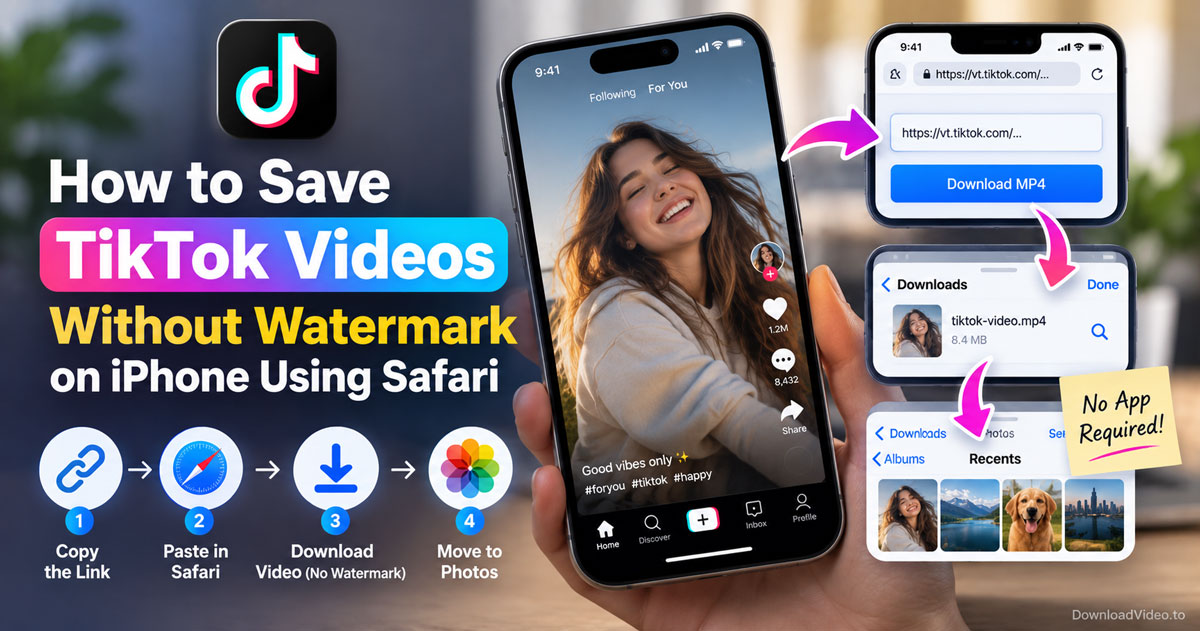
You can save TikTok videos without watermark on iPhone by copying the video link from the Share menu, pasting it into a browser downloader in Safari and choosing the MP4 without watermark. The file lands in Files, and one tap moves it into Photos.
TikTok's own Save video button always leaves the moving username on the clip because TikTok renders a separate watermarked copy for it. A browser tool fetches the original stream instead, so the frame stays clean.
The method needs no app, no account and no jailbreak. Below are the exact taps, where the file ends up, and what to do with your own drafts.
Can you save TikTok videos without the watermark on iPhone?
Yes, you can save TikTok videos without the watermark on iPhone, because a browser downloader runs inside Safari without an app, pulls the original file rather than the watermarked copy, and saves the MP4 straight to Files.
Each of those three points removes a common obstacle, so here is how they play out for a TikTok video on iPhone. Apple does not allow TikTok downloader apps on the App Store, which is why most guides for iPhone either point at a browser tool or at clumsy workarounds like screen recording. A browser tool needs nothing installed and asks for no TikTok password.
The clean file is possible because TikTok stores two versions of every public video. The app streams the original, and a second version with the animated username overlay exists only for the built-in save button. The TikTok video downloader without watermark reads the first one. Private accounts, friends-only videos and deleted posts do not work, since TikTok never serves those files without a logged-in session.
How to save TikTok videos without watermark on iPhone in 4 steps
Copying the TikTok link, pasting it in Safari, choosing the MP4 without watermark and saving the file to Photos gets a clean TikTok video onto your iPhone in four steps, in about a minute.
The four steps below follow the order you will take on the phone, from the TikTok app to your camera roll.
Step 1: Copy the TikTok link. Open the TikTok app, find the video, tap the Share arrow on the right side of the screen and choose Copy link. Short links that start with vm.tiktok.com or vt.tiktok.com work just as well as the full address.
Step 2: Paste it in Safari. Open Safari and go to DownloadVideo.to. Tap inside the input box, tap Paste in the small bubble that appears, then press Download. The tool reads the video in a few seconds.
Step 3: Choose the MP4 without watermark. The result shows several buttons. Pick MP4 without watermark, or the HD version when TikTok provides one. If you only want the sound, the MP3 button sits next to them.
Step 4: Save the file to Photos. Safari shows a download arrow in the address bar while the MP4 saves. Open the Files app, go to Downloads, tap and hold the video, choose Share and then Save Video. The clean clip now appears in Photos like any other video.
If Safari asks whether to download the file before it starts, tap Download. That prompt appears once per site, and after that Safari saves without asking.
Why does TikTok's Save video button keep the watermark?
TikTok's Save video button keeps the watermark because it hands you a copy that TikTok renders on its servers with the animated username and logo baked into every frame, not the original file the creator uploaded.
The watermark is a feature for TikTok rather than a bug, which explains why the Save video route can never give you a clean clip. TikTok wants every shared clip to advertise the creator and the platform, so the overlay moves around the frame to make cropping useless. A browser downloader avoids the problem instead of fighting it: it never touches the watermarked copy, so there is nothing to remove.
Quality follows the same logic. The original stream matches what the creator uploaded, usually up to 1080p, and an HD button appears only when TikTok stores a higher-bitrate version. Older or heavily compressed uploads come in standard quality, and no tool can invent detail that TikTok never had.
That covers the everyday case of saving someone else's public video. The next section compares the routes side by side and handles the case of your own posts.
Browser tool vs TikTok app: which way saves cleaner on iPhone?
The browser tool wins on watermark and quality, screen recording is only useful when no link exists, and TikTok's own Save video button is quickest but always stamps the overlay on the clip.
The table below compares the three ways people save a TikTok video on iPhone, by watermark, quality and setup.
| Method | Watermark | Quality | Needs an app |
|---|---|---|---|
| Browser tool in Safari | None | Original, up to 1080p | No |
| TikTok Save video button | Yes, animated | Original | TikTok app only |
| Screen recording | Yes, plus interface | Re-encoded, screen resolution | No |
What quality does the iPhone download keep?
The iPhone download keeps the same resolution the creator uploaded, because Safari saves the original MP4 that TikTok streams rather than a re-encoded copy. Most videos come at 720p or 1080p. When the result shows an HD button, TikTok has a higher-bitrate file available, and that is the one to pick for editing or reposting on a larger screen.
How to save your own posted TikTok without watermark
To save your own posted TikTok without watermark, copy its link from the Share arrow on your profile and run it through the browser tool exactly like any other public video. Drafts have no public link, so no downloader can reach them. Post the video first, save the clean MP4, then change the post's visibility afterwards if you never intended to keep it public.
Frequently asked questions
Is there a way to save a video on TikTok without the watermark?
Yes. Copy the video link from the Share menu, paste it into a browser downloader such as DownloadVideo.to and choose the MP4 without watermark. The tool returns the original file rather than the watermarked copy TikTok makes for its own Save video button.
How can I download TikTok videos without a watermark?
Open the video in TikTok, tap Share, choose Copy link, then paste the link into the downloader in your browser and press Download. Pick MP4 without watermark from the result. On iPhone the file goes to Files first, and Save Video moves it into Photos.
How can I remove the watermark from my TikTok video?
Do not try to edit the watermark out, because it moves around the frame and cropping or blurring damages the clip. Download the original file through the browser tool instead, which has no watermark to begin with and keeps the full resolution.
How to save a TikTok draft to camera roll without watermark?
A draft has no public link, so no downloader can read it. Publish the video, copy its link from the Share arrow, save the clean MP4 through the browser tool, and then adjust the post's visibility if you want it out of sight.
Is it free to save TikTok videos without watermark on iPhone?
Yes. DownloadVideo.to is free with no download limit, no sign-up and no extension. It runs over HTTPS, needs only a public link and never stores the videos or links you paste.